Restore from backup
Bring a panel back to the last known-good state after a bad change, a corrupt DB, or a fresh install on new hardware.
What is in an argos backup
Each backup is a single tar.gz under /data/backups/ containing:
argos.db— aVACUUM INTOsnapshot of the SQLite DB at the moment the backup ran. Fully consistent, no WAL residue.metadata.json— argos version, git commit, schema version, timestamp, kind (manual/scheduled/orphan), count of caddy files included.caddy/(optional) — a copy of the Caddy data directory (/datain the caddy container, mounted read-only into argos) if the argos container had access to it at backup time. Contains TLS certs + ACME state.
Backups are local only; there is no argos-side rclone / off-site push. If you need off-site, mirror /data/backups/ out of band (rclone as a sidecar container, borg, rsync, whatever you already run).
1. Pick the source
Backups tab shows every row recorded in the panel DB. Columns: filename, size, sha256, kind, created, note.
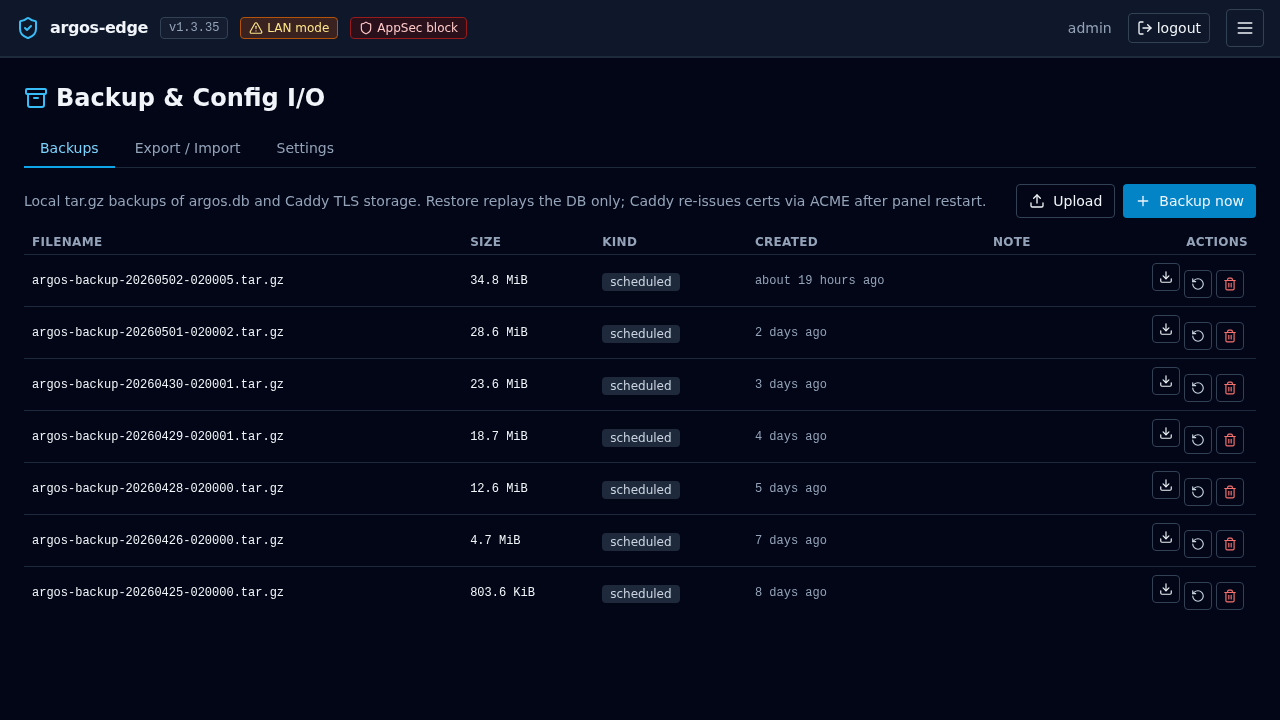
If the DB itself is intact you can restore in-place from the row. If the DB is corrupt or you are on a fresh install, upload the tar.gz from disk — you need to have a copy already.
2a. In-place restore (DB still works)
Prerequisite: the backup is in /data/backups/ and listed in the Backups tab.
Backups → row → Restore. Confirm the dialog. Argos:
- Writes a marker file
/data/.restore_pendingcontaining the archive path. - Returns 202 and drops your session.
- On next container start (you restart manually), argos reads the marker, extracts the tar.gz on top of
/data, replacesargos.db, then clears the marker and boots normally.
You will have to docker compose restart argos yourself — the endpoint schedules the work but does not self-kill.
After restart, log in again. The panel is back at the state of the backup.
2b. CLI restore (fresh install or unreachable panel)
If the panel's own DB is not usable (you cannot log in, cannot reach the Backups tab), use the argos restore subcommand. It runs directly against the container's data volume and does not need a session.
Bring the tar.gz onto the argos host, then:
# Copy the tar.gz into the argos data volume.
docker compose cp ./argos-backup-20260418-021500.tar.gz argos:/data/backups/

# Invoke the restore CLI. Both --file and --yes are required;
# --yes acknowledges that the current DB will be replaced.
docker compose exec argos \
  argos restore --file /data/backups/argos-backup-20260418-021500.tar.gz --yes

docker compose restart argos
Same finish: the restart reads the /data/.restore_pending marker the CLI wrote and extracts.
There is also an authed HTTP endpoint (POST /api/backups/upload-and-restore) for operators who have a working panel but want to restore an archive that was never listed in the Backups tab (e.g. copied in from another host). The CLI is the right tool when the panel is unreachable.
3. Verify
After the restart:
- Log in. Credentials are from the backup's point in time — if you rotated the admin password between backup and restore, use the pre-rotation password.
- Backups tab: the restore itself shows up as an audit event; no new backup row is created (the restore is not a snapshot).
- Hosts tab: every host from the backup is there and Caddy is already configured for them (the reconciler runs on boot).
- Certs tab: if
caddy/was included in the tar.gz, the certs are already valid. If not, the next request to each host triggers a fresh ACME exchange.
4. What is NOT in the backup
- In-memory state: pending OIDC logins, TOTP challenge store, ForwardAuth cache, notification rate-limit buckets. All of them live in process memory and rebuild on the fly — safe to lose.
- CrowdSec's own DB (
crowdsec_datavolume). If you lost that too, CrowdSec will re-enroll and re-download the community feed on its own; you may need to regenerate the bouncer API key (docker compose exec crowdsec cscli bouncers add caddy) and update the Caddy config. - Caddy access + error logs. Backups cover current state, not history. Log-entries rows up to the backup point are included in
argos.db; anything written after is gone.
Manual cert files are NOT in the tarball — but they come back automatically
The caddy_manual_certs volume (plaintext .crt + .key for manual-mode hosts) is out of scope for the backup tarball. The encrypted key lives in argos.db's host_manual_certs table; on the next boot the panel's reconciler decrypts it and writes the files to the caddy-shared volume. Cross-host restore works without separately capturing this volume as long as ARGOS_MASTER_KEY is unchanged. See Manual certificates → Disaster recovery.
ARGOS_MASTER_KEY is required for DR
Without the original ARGOS_MASTER_KEY every encrypted secret is unrecoverable: manual cert keys, OIDC client secrets, SMTP passwords, Telegram tokens, VAPID private keys. Keep .env out of band alongside the tarball. A backup is not enough on its own.
5. Rolling back a failed restore
If the restore marker file got written but the extract fails, argos refuses to boot and logs the reason (docker compose logs argos). Clear the marker by hand:
The panel boots with whatever DB was there before the restore attempt (the extract is all-or-nothing; failure leaves you on the pre-restore state).