Add a host
End-to-end: from a service sitting on your LAN to a public-facing host with TLS, optionally WAF-protected and optionally behind SSO. The minimum is steps 1-5; the rest are optional hardening that you can layer on without re-creating anything.
0. Pre-flight checklist
Before you touch the panel:
- DNS record (
AorAAAA) for the target domain resolves to the public IP of the host running argos. The record has to be live at the time of the first request, or the ACME challenge fails.dig +short myapp.example.comshould answer with your host's IP. - Backend reachable from argos:
docker compose exec argos wget -qO- http://10.0.0.42:8080/(or whatever your backend is) should return content. Firewalls between argos and the upstream bite silently here. - Ports open for the challenge you plan to use. See TLS challenges for the full matrix. Briefly:
- DNS-01 (default): no inbound ports required; a
CLOUDFLARE_API_TOKENon the caddy container is. - HTTP-01: port 80 reachable from the internet.
- TLS-ALPN-01: port 443 reachable from the internet.
- DNS-01 (default): no inbound ports required; a
1. Create a target group
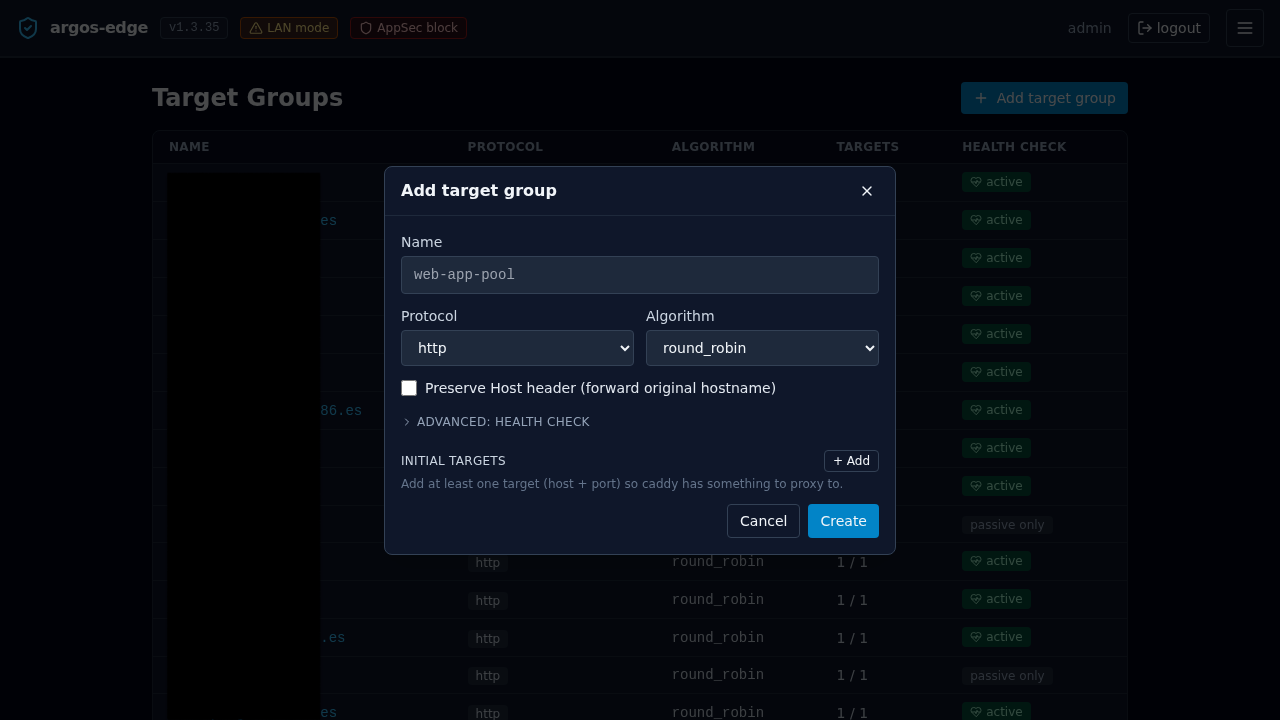
Target groups decouple the public host from the backend set. Even if you only have one backend today, you create the group first — the host selector needs something to attach to.
Target Groups → New target group:
- Name — human label.
myappormyapp-prod. Must be unique. - Protocol —
httpif the backend speaks plain HTTP (most homelab services),httpsif it already terminates TLS with a valid cert. - Verify upstream TLS — only meaningful for
https. On = reject self-signed. Off = accept. Default on; flip off for the typical homelab backend with a self-signed cert. - Algorithm —
round_robin(default, correct for most homelabs),least_conn(bias new connections to the least-busy target),ip_hash(session-stickiness by client IP),random(rare). - Health check — leave off for the first pass; turn on once the group has 2+ targets. Covered below.
Save.
1b. (Optional) Health checks
Open the new group. Toggle Health check enabled:
- Path —
/healthz,/health, or whatever your backend exposes. - Method —
GETorHEAD.POSTis allowed too but almost never what you want. - Expect status —
200for a single code,200,204for a CSV list, or200-299for a range. Caddy's active health check honours all three forms. - Interval seconds — 30 is the default and fine.
- Timeout seconds — 5 default. Raise for slow health endpoints.
- Fails to unhealthy / Passes to healthy — 2 / 2 default. Raise fails-to-unhealthy if your backend flaps under load.
Passive health checks (3 fails → 30 s cooldown) are always on; the active toggle is layered on top.
2. Add targets
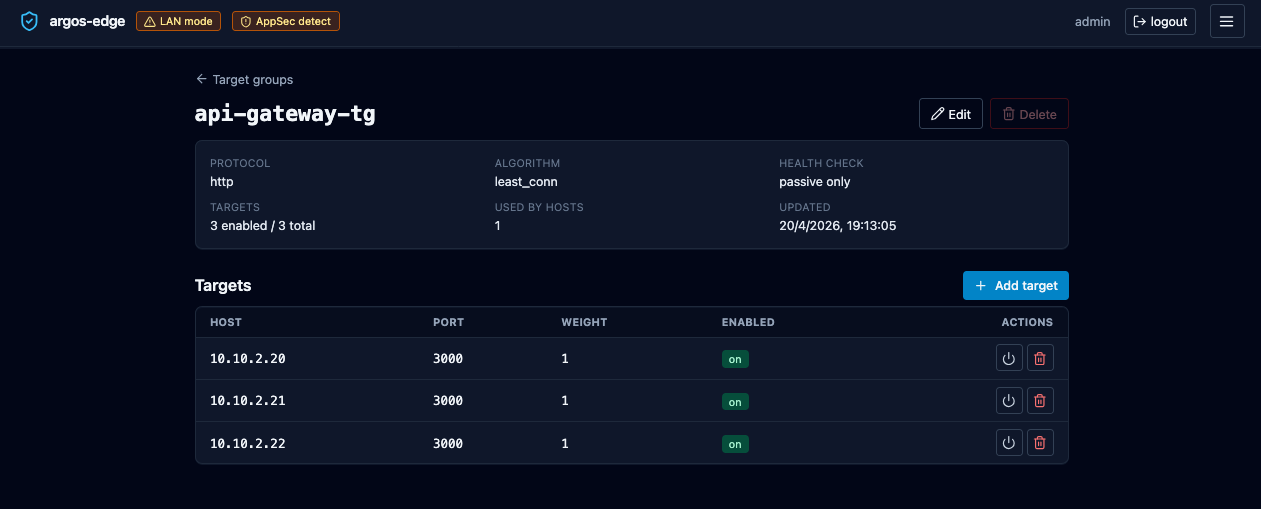
Same page, Add target:
- Host — IP literal (
10.0.0.42) or DNS name (backend.lan). Must be reachable from the argos container. IPv6 needs brackets in URL form but the Host field accepts the bare address. - Port — 1–65535.
- Weight — default 1. Raise for a target that should take more traffic (e.g. 2 vs 1 = 2:1 split on round-robin).
- Enabled — leave on. Disabled targets stay in the group but Caddy stops routing to them; useful for a drain.
Repeat for every backend. Save.
3. Create the host
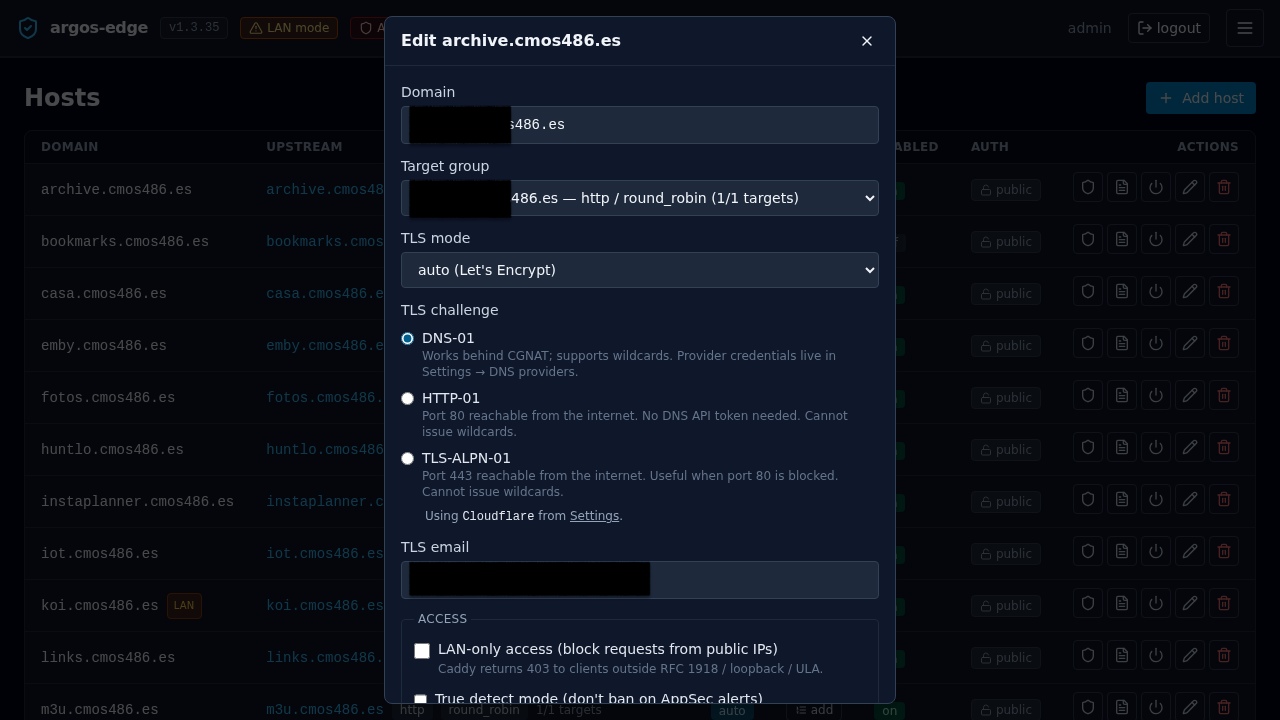
Hosts → New host:
- Domain — the public name. Exactly what resolves via DNS.
- Target group — select the one you just made.
- TLS mode —
auto(default): Caddy provisions a Let's Encrypt cert automatically on first request.none: serves HTTP only. Used for internal names or testing.manual: upload your own cert + key; argos never touches ACME for this host. See Import own cert workflow.
- TLS challenge (only when mode is
auto) —DNS-01(default): works behind CGNAT, supports wildcards. Requires a DNS provider configured in Settings → DNS providers.HTTP-01: port 80 reachable from the internet; no wildcards.TLS-ALPN-01: port 443 reachable from the internet; no wildcards. See TLS challenges for the decision matrix.
- DNS provider (only when TLS challenge is
DNS-01) — the panel reads encrypted credentials from thedns_providerscatalogue for the selected provider and streams them inline to Caddy at reconcile time. If exactly one provider is enabled in Settings, it is auto-selected and the field shows "Using <provider>". If multiple are enabled, a dropdown picks between them. If none are enabled, an amber warning points you at Settings and Save is blocked. See DNS providers. - TLS email — contact for ACME. Let's Encrypt uses it for expiry reminders. Required when TLS mode is
auto. - Enabled — on.
Save. The reconciler pushes the new config to Caddy within a second.
4. Verify
From another machine:
First response may take a few seconds while Caddy completes the ACME exchange. Subsequent responses are fast.
In the panel:
- Logs tab, filter
source = caddy_access. Your curl should show with its User-Agent, status, and upstream. If it does not, Caddy never saw the request — DNS or firewall problem. - Certs tab, row for the new domain with a
not_afterabout 90 days in the future. - Dashboard traffic card bumps on the next refresh.
5. (Optional) Turn on the WAF
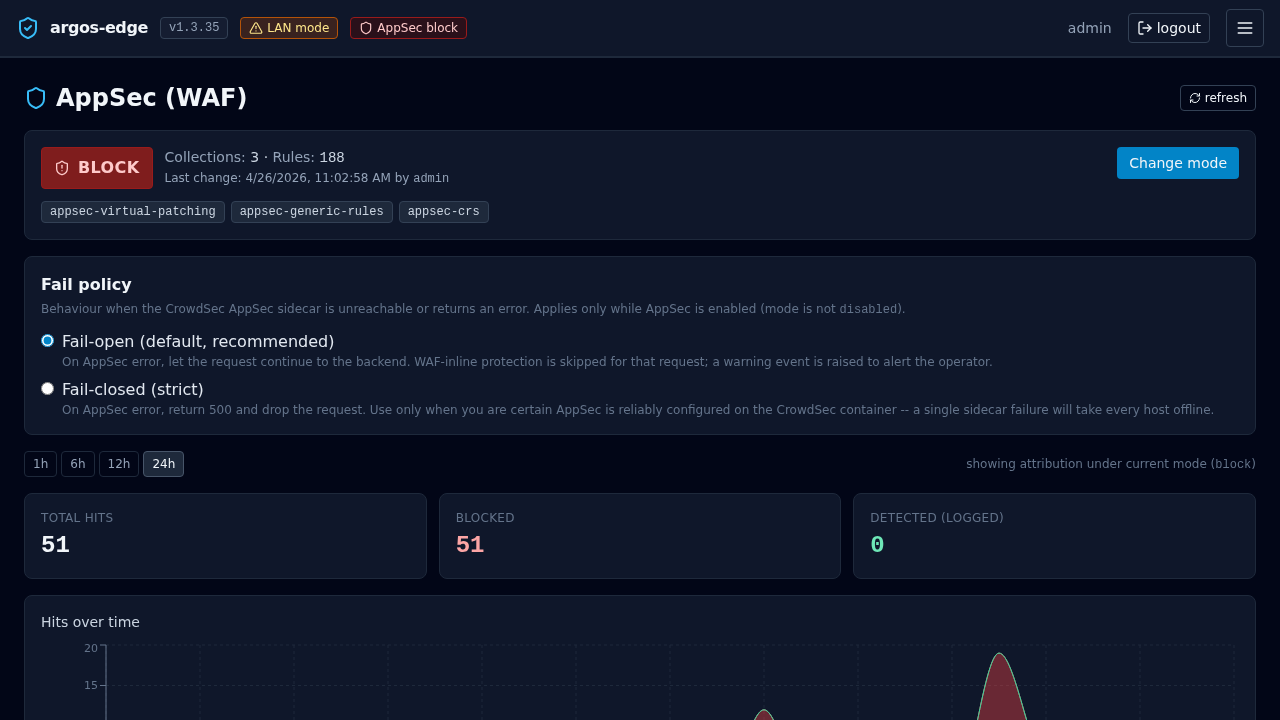
The Coraza / OWASP CRS WAF runs via the CrowdSec AppSec component. Argos has three modes plus a per-host enable flag:
- Hosts → your host → Security. Toggle WAF enabled.
- First run with Mode = detect. This logs matches but does not block. Leave it for a day or two and watch AppSec tab:
- False positives show up as recurring rule IDs on your own traffic.
- Real attacks show up once every few minutes on most internet-exposed hosts.
- For false positives, add WAF exclusions (same page). Scope them to the path pattern and CRS rule ID that fired. Prefer narrow exclusions (
path=/api/upload+ rule920420) over disabling a whole category. - When AppSec → metrics is quiet for a day, flip the host's WAF Mode to block. In-band matches now return 403.
Full reference: WAF.
6. (Optional) Put the host behind SSO
Only works after the panel itself has OIDC configured. If you have not done that yet: Publish with SSO. Quick version:
- Panel System → Single sign-on has a valid OIDC client + issuer + the Cookie parent domain set to the parent of both the panel and this new host (e.g.
example.comforpanel.example.com+myapp.example.com). - Hosts → your host → Auth required toggle on.
Every request to myapp.example.com now goes through ForwardAuth against the panel. Without a valid session cookie the user is 302'd to the panel's login and back on success.
7. (Optional) Add Rules for per-path behaviour
Hosts → your host → Rules lets you override the default target-group dispatch per path / header / matcher. Five action types are available:
| Action | Use for |
|---|---|
forward | Route to a different target group for this match. E.g. /admin/* → admin-only backend. |
redirect | HTTP 301/302/307 to another URL. |
fixed_response | Return a canned status + body. Handy for maintenance pages. |
block | Return 403 for requests that match. Use for IP blocklists or path blacklists. |
rewrite | Internal path rewrite before forwarding. |
Rules evaluate in priority order (low first), and the first match is terminal. Unmatched requests fall through to the host's default target group.
Rate limiting is per-host, not per-rule
Argos does not have a rate_limit rule action. Rate limiting lives at the host level under Hosts → your host → Security → Rate limit, keyed by IP / header / global. If you need per-path quotas, split the paths into different hosts or wait for a future version.
8. (Optional) Active rate limiting
Hosts → your host → Security → Rate limit enabled:
- Requests per Window seconds.
300 / 60= 300 rpm. - Key =
ip(per remote IP),header(per value of a named header), orglobal(one bucket for every client). - Status returned on limit hit — 429 default.
Caddy enforces this in front of the WAF and upstream.
9. Monitoring ongoing
Day-two knobs:
- Dashboard → Security overview: attack signal aggregates for this host and the full panel.
- Threats tab: CrowdSec decisions currently active against IPs that have hit your hosts.
- Logs tab: any request you want to dig into. Filter by
host_domain = myapp.example.com+source = waf_auditto see WAF hits,source = caddy_accessfor traffic,level = error+source = caddy_errorfor upstream problems. - Notifications: wire a rule so you find out about WAF bursts / cert renewal failures / target down events the same way you find out about other things, not by refreshing the dashboard. See Notifications.
Rollback
Delete a host: Hosts → row → Delete. Caddy drops the config on the next reconcile; the cert stays in caddy_data for a while and is reaped on its next scheduled renewal.
Disable without deleting: toggle the Enabled switch off. Caddy returns a 404 for the host until you flip it back.
Delete a target group: you cannot delete one that any host currently references. The panel will surface the blocking host IDs so you can retarget first.