DNS providers
Before v1.3 the panel shipped with exactly one DNS provider for ACME DNS-01: Cloudflare, with the token passed as the CLOUDFLARE_API_TOKEN environment variable on the caddy container. v1.3 generalises that to a catalogue of providers whose credentials live encrypted in the panel DB and are streamed inline into the Caddy /load JSON at every reconcile.
What's supported
- Two providers compiled into the Caddy image:
cloudflare(unchanged from v1.2).route53(AWS Route 53; new in v1.3).
- Per-provider credentials in the DB, AES-GCM-encrypted under
ARGOS_MASTER_KEY(same master key that already protects OIDC client secrets, SMTP passwords, manual-cert private keys, the VAPID key). - Option 2 credentials pipeline: decrypted values are inlined into the Caddy
/loadJSON on every reconcile. The panel never writes a new env var, the caddy container never restarts on credential rotation. - Per-host
tls_dns_providercolumn. Hosts that usetls_challenge='dns'carry a provider name (defaultcloudflarefor rows migrated from v1.2). Migration 025 backfills. - Legacy env-var import on boot. If
CLOUDFLARE_API_TOKENis set in the panel's environment AND thedns_providerstable has no cloudflare credentials, the env value is encrypted and imported on boot. Idempotent; logs a one-time INFO advising the operator to remove the env value from.envat their convenience. The env var continues to work as a fallback for one release; it is scheduled for removal in v1.4. - Settings → DNS providers card grid: one card per supported provider, enable/disable toggle, credential form, Configured / Not configured badges, "How to get credentials" deep link to the provider's docs, warning callout on the trust boundary (decrypted creds flow through Caddy's admin API).
- Host form gets a provider dropdown under the DNS-01 radio. One provider enabled = auto-select with a caption. Multiple enabled = native dropdown. None enabled = amber warning with a deep link to Settings and Save blocked client-side.
- Secret-field preservation: the API-key / secret-access-key inputs start as masked placeholders on already-configured providers. Click Edit to replace, or leave untouched and the backend keeps the existing ciphertext via the
__UNCHANGED__sentinel.
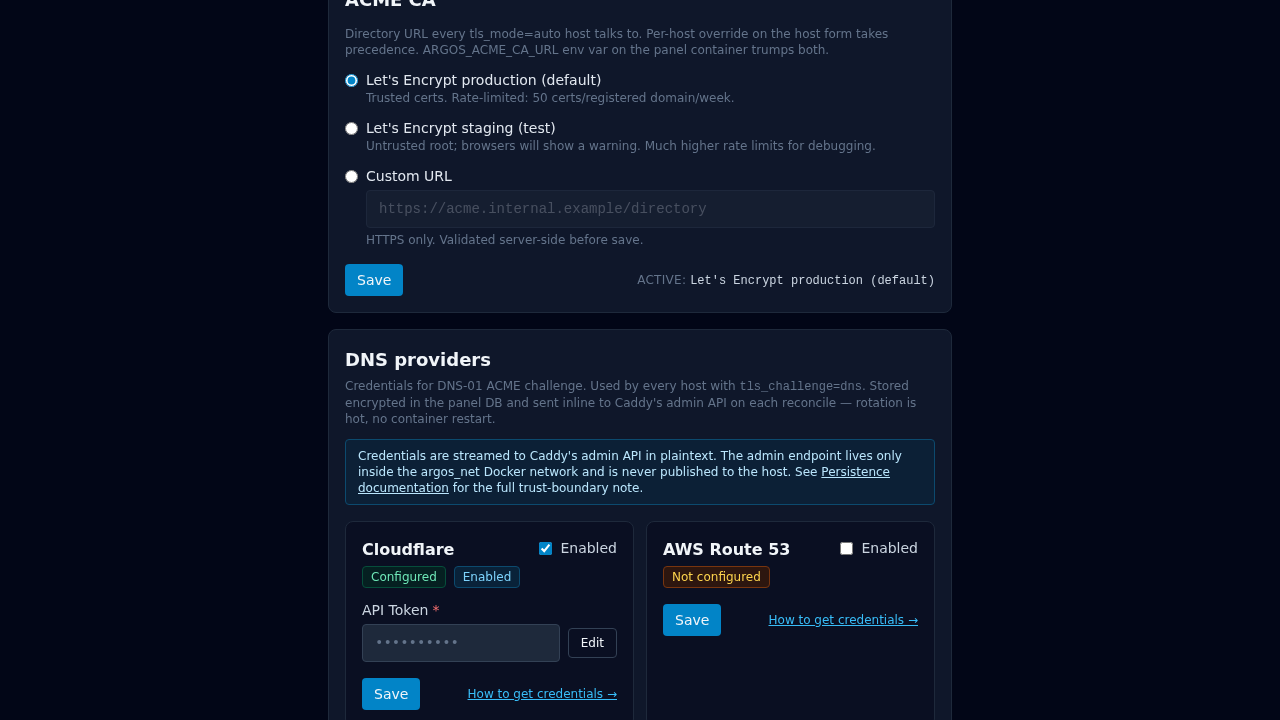
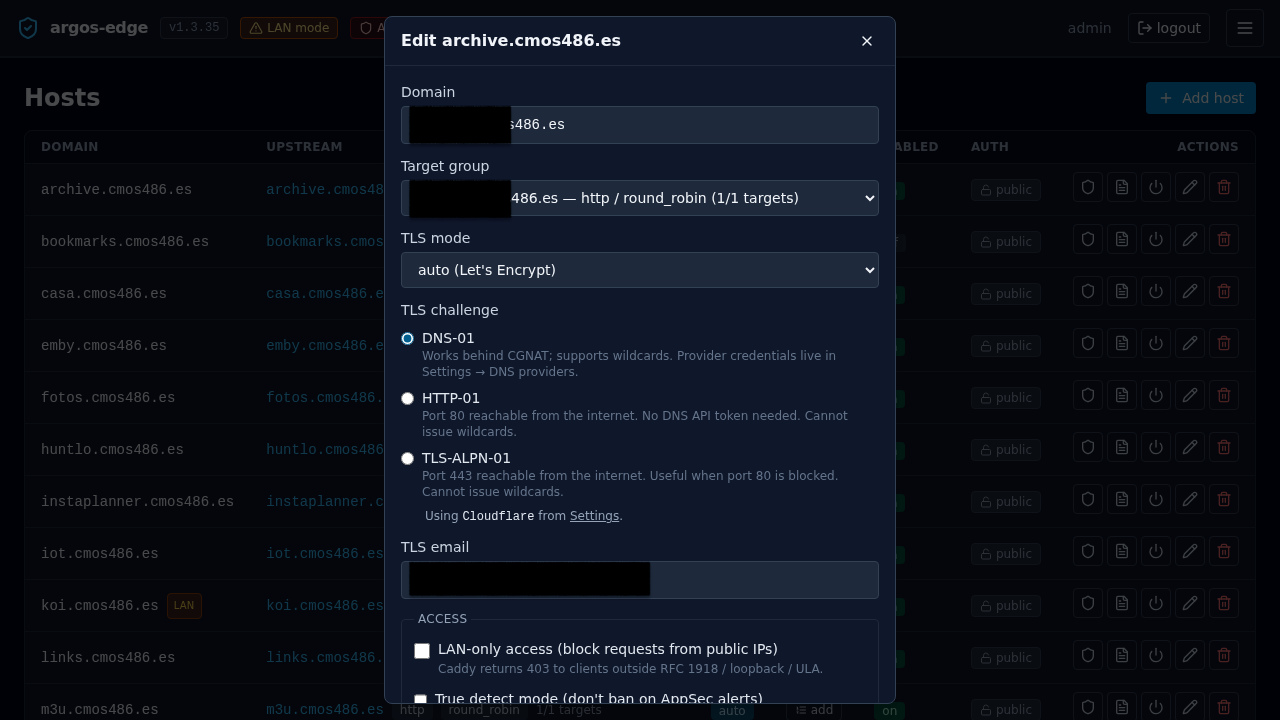
Using the Settings page
- Open Settings → DNS providers.
- Locate the provider's card (Cloudflare or Route 53).
- Flip the Enabled toggle.
- Fill in the credential fields. Click How to get credentials → if you need to look up token scopes / IAM permissions.
- Click Save. A toast confirms the save and the reconcile.
Credentials rotate hot: saving a new value pushes it into Caddy on the next /load (automatic, same request). No container restart. If the next reconcile rejects the new value (bad token format, etc.) you see a yellow banner inside the card with the exact Caddy error.
Using the host form dropdown
- Open Hosts → Add host (or edit an existing host).
- Set TLS mode to
auto. - Pick DNS-01 in the TLS challenge radio group.
- DNS provider appears just below:
- One enabled → "Using <provider> from Settings" caption.
- Multiple enabled → native dropdown. Pick one.
- None enabled → amber warning + deep link to Settings. Save is blocked until at least one provider is configured.
- Save.
API surface (scripting + automation)
The UI uses these endpoints, but they are stable and scriptable too: compose-level bootstrap, CI-driven credential rotation, bulk onboarding, etc. All three live under the existing session-authed group at /api/dns-providers.
GET /api/dns-providers
Returns the catalogue joined with DB state. Credentials are NEVER included.
[
  {
    "name": "cloudflare",
    "display_name": "Cloudflare",
    "enabled": false,
    "configured": false,
    "fields": [
      {"key": "api_token", "label": "API Token", "required": true,
       "placeholder": "Zone:DNS:Edit scoped token", "secret": true}
    ],
    "caddy_module": "cloudflare",
    "docs_url": "https://dash.cloudflare.com/profile/api-tokens"
  },
  {
    "name": "route53",
    "display_name": "AWS Route 53",
    "enabled": false,
    "configured": false,
    "fields": [
      {"key": "access_key_id", "label": "AWS Access Key ID", "required": true,
       "placeholder": "AKIAIOSFODNN7EXAMPLE"},
      {"key": "secret_access_key", "label": "AWS Secret Access Key",
       "required": true, "secret": true},
      {"key": "region", "label": "AWS Region", "required": false,
       "placeholder": "us-east-1 (default)"}
    ],
    "caddy_module": "route53",
    "docs_url": "https://docs.aws.amazon.com/IAM/latest/UserGuide/id_credentials_access-keys.html"
  }
]
GET /api/dns-providers/{name}
Same shape, one provider.
PUT /api/dns-providers/{name}
Sets enabled and credentials. Required-field validation runs against the catalogue; unknown fields are rejected.
Set Cloudflare credentials and enable:
curl -b cookies.txt -X PUT http://localhost:8080/api/dns-providers/cloudflare \
    -H "Content-Type: application/json" \
    -d '{
          "enabled": true,
          "credentials": {
            "api_token": "your-scoped-cf-token"
          }
        }'
Set Route 53 credentials and enable:
curl -b cookies.txt -X PUT http://localhost:8080/api/dns-providers/route53 \
    -H "Content-Type: application/json" \
    -d '{
          "enabled": true,
          "credentials": {
            "access_key_id": "AKIA...",
            "secret_access_key": "wJalrXUtnFEMI/K7MDENG/bPxRfiCYEXAMPLEKEY",
            "region": "eu-west-1"
          }
        }'
Disable a provider (keep credentials for re-enable):
curl -b cookies.txt -X PUT http://localhost:8080/api/dns-providers/route53 \
    -H "Content-Type: application/json" \
    -d '{"enabled": false}'
Rotate one secret, keep the others: send the __UNCHANGED__ sentinel in the fields you do NOT want to rotate.
curl -b cookies.txt -X PUT http://localhost:8080/api/dns-providers/route53 \
    -H "Content-Type: application/json" \
    -d '{
          "enabled": true,
          "credentials": {
            "access_key_id": "__UNCHANGED__",
            "secret_access_key": "new-rotated-secret",
            "region": "__UNCHANGED__"
          }
        }'
On success a reconcile runs automatically, so the new creds land on Caddy's running config within the same request. No container restart needed.
Host-level selection
Hosts that set tls_challenge='dns' now also carry tls_dns_provider. The Host API PUT/POST accepts the new field:
curl -b cookies.txt -X PUT http://localhost:8080/api/hosts/1 \
    -H "Content-Type: application/json" \
    -d '{
          "domain": "example.com",
          "target_group_id": 1,
          "tls_mode": "auto",
          "tls_email": "ops@example.com",
          "enabled": true,
          "tls_challenge": "dns",
          "tls_dns_provider": "route53"
        }'
The backend rejects tls_dns_provider values that are not in the catalogue, or that point at a provider row that is disabled or missing credentials. Legacy compat: if the target provider is cloudflare AND the legacy env var CLOUDFLARE_API_TOKEN is set, the save succeeds even without a DB row (reconciler then emits the env placeholder).
Migration from v1.2
Operators upgrading from v1.2 have two choices:
- Do nothing for now. Keep
CLOUDFLARE_API_TOKENin.env. The boot-time import encrypts it into the DB the first time the panel sees it; the env var continues to work as fallback until the row is populated. Eventually remove the env var when comfortable. - Actively configure via API.
PUT /api/dns-providers/cloudflarewith the token, then drop the env var on the next restart. The boot-time import sees the populated DB row and skips.
Trust boundary note (Option 2)
Credentials are decrypted in the panel process at every reconcile and inlined into the JSON pushed to http://caddy:2019/load. A subsequent GET /config/... from inside the Caddy container will return the plaintext credentials. The admin API listens only inside the argos_net Docker network and is never published on the host, so the trust boundary is the same as it was pre-v1.3 for the CrowdSec bouncer API key placeholder. Anyone who can shell into the caddy container could already read env | grep CLOUDFLARE in v1.2. Formalising the admin-API boundary in docs/operations/persistence.md is still on the list for v1.3.0 GA.
What's NOT here
- Test-connection button that pings the provider's API before the first cert-issuance attempt. Deferred; first real issuance already produces a clear error via
caddy_errorlogs. - Tier 2 providers — see Roadmap below.
Roadmap
v1.3.0 ships with Cloudflare + Route 53 — the two providers that cover the majority of argos-edge installations surveyed during the v1.3 scoping work. Expansion to additional providers is deliberately gated on user demand rather than batched up-front. Each addition is mechanically small: one --with github.com/caddy-dns/<name> line in the Caddy Dockerfile, one entry in the internal catalogue (backend/internal/dnsproviders/catalog.go), a migration that extends the dns_providers.name CHECK, and a provider-specific docs snippet. No architecture change.
Tier 2 candidates (from docs/internals/dns-providers-analysis.md):
| Provider | Upstream module | Typical use |
|---|---|---|
| Hetzner | caddy-dns/hetzner/v2 | EU homelab popular |
| DigitalOcean | caddy-dns/digitalocean | Homelab default |
| Porkbun | caddy-dns/porkbun | Indie registrar with real API |
| Gandi | caddy-dns/gandi | EU registrar (PAT auth) |
| deSEC | caddy-dns/desec | Privacy-oriented, free |
| OVH | caddy-dns/ovh | EU hosting |
| DuckDNS | caddy-dns/duckdns | Dynamic-DNS use case |
| acme-dns | caddy-dns/acmedns | CNAME-delegation escape hatch |
Opening an issue with a concrete use case and a willingness to dogfood the provider is the fastest path to having it land in a v1.3.x. Each provider ships in isolation — no tight coupling forces a single big release.
For providers that never land natively, the Manual DNS workflow (acme.sh + Import) remains fully supported and covers every libdns-capable provider at the cost of manual renewal every ~60 days.
Related
- Reverse proxy → TLS challenges — the existing options. DNS-01 uses the provider dropdown added in v1.3.
- Manual DNS workflow — the acme.sh + Import fallback for providers not yet in the native catalogue.
- Persistence — what the encrypted-at-rest promise covers. DNS provider credentials live in
argos.db, backed up by the standard backup path.