CrowdSec
CrowdSec gives argos two things: a local detection engine that reads Caddy's access logs and produces decisions for IPs behaving badly, and a community blocklist pulled from the CrowdSec hub every few minutes. Both result in bans that Caddy's bouncer plugin enforces at the edge, before any other argos logic runs.
What lives where
- CrowdSec LAPI daemon in the
crowdseccontainer. Owns scenarios, parsers, decisions. SQLite-backed at/var/lib/crowdsec/data/crowdsec.db. - AppSec component in the same container — a separate HTTP listener (
:7422/:7423) that inspects each request's payload against Coraza + OWASP CRS rules. Independent from the LAPI bouncer; can be on, off, or broken without affecting IP bans. See AppSec (CrowdSec WAF-inline) for the setup story, the three operating scenarios, and theappsec.fail_openpolicy. WAF covers the rule-level UI on top of it. - Caddy bouncer plugin inside the
caddycontainer. Polls LAPI everycrowdsec.poll_interval_seconds(default 15 s), caches active decisions, blocks matching IPs in-band. - Argos panel reads LAPI via the
machinecredentials for the/securitytabs + the country expansion / decision-list / drift-detection endpoints. The panel also runs three reconciler goroutines (drift detector, country reconciler, country JobRunner) — see Components for the full list.
Two separate credentials are used:
- Bouncer API key — Caddy's read-only hook to fetch decisions.
- Machine user + password — argos' admin hook used to list / create / delete decisions through the LAPI.
Both live as settings (crowdsec.bouncer_api_key, crowdsec.machine_user, crowdsec.machine_password). Empty values disable the panel's CrowdSec features; the bouncer reads its key straight from env (CROWDSEC_BOUNCER_API_KEY in .env) and does not depend on the panel.
First-run setup
One-time cscli dance against the running CrowdSec container:
# 1. Add a bouncer for Caddy.
docker compose exec crowdsec cscli bouncers add caddy-edge
# copy the printed key into .env as CROWDSEC_BOUNCER_API_KEY
docker compose restart caddy

# 2. Create a machine user for the panel.
docker compose exec crowdsec cscli machines add argos-panel --password
# enter a password; copy both into Settings -> CrowdSec
# (Machine user + password).

# 3. Enroll the instance to get the community blocklist.
docker compose exec crowdsec cscli console enroll <your-enrollment-code>
Enrollment is optional but recommended — without it, the community feed is unavailable and you only get local detection.
Scenarios (detection)
CrowdSec ships with dozens of scenarios under crowdsecurity/. Relevant ones for an argos deploy:
crowdsecurity/http-crawl-non_statics— crawler hitting non-static paths at rate.crowdsecurity/http-probing— 404-storm scanner.crowdsecurity/http-bad-user-agent— malformed / known-bad UAs.crowdsecurity/http-bf-wordpress_bf— WordPress brute-force.crowdsecurity/http-xss-probing— stored XSS scanner.
Extend from the hub: cscli collections install. argos surfaces the currently-installed collection list under Security → Scenarios, which also lets you toggle individual scenarios off (the operator-disabled set is materialised into a sentinel + consumed on the next setup-appsec.sh run; see Scenarios management below).
The Scenarios tab also enriches each row with the hub-catalogue description on hover (v1.3.30). The descriptions come from a slimmed /data/shared/argos-scenarios-index.json that setup-appsec.sh produces from the read-only-mounted hub catalogue (the reverse-sentinel pattern — docs/architecture/storage.md#out-of-band-sentinels-datashared).
Scenarios management
Security → Scenarios lets you disable installed scenarios without uninstalling the underlying collection. The flow:
- Operator clicks "Disable" on a scenario in the panel.
- Panel writes the canonical name to
/data/shared/argos-disabled-scenarios.txt. - Operator runs
docker compose exec crowdsec /setup-appsec.sh. - Script
cscli scenarios remove --forces each line. - CrowdSec reloads.
Re-enable: same flow in reverse (panel removes from sentinel; script re-installs the collection on next run).
The drift detector (60s ticker) catches the gap between step 2 and step 4: while the panel claims a scenario is disabled but the script hasn't run yet, the /security/scenarios tab shows a "Pending reload" badge. See Drift detection for the full protocol.
LAPI tuning (v1.3.28+)
CrowdSec ships with a flush.max_items: 5000 default cap on the alerts table. Two argos-specific config knobs in crowdsec/config.yaml.local matter for stability:
db_config.use_wal: true(v1.3.28). Without WAL, the community-blocklist sync (~15k decisions every ~2h) holds an exclusive writer lock that stalls the panel's/v1/decisionsreads for 3-4 seconds. CrowdSec emits a startup warning when this is off:
sqlite is not using WAL mode, LAPI might become unresponsive when inserting the community blocklist
argos's shipped config.yaml.local sets use_wal: true.
flush.max_itemsinteraction with bulk emit. v1.3.31's per-CIDR alert shape collided with this cap and silently flushed older argos-country-* alerts when the operator expanded multiple countries totalling >5000 CIDRs. v1.3.33's alert-shape restructure (one alert with N decisions inside, mirroring CAPI's community-blocklist pattern) eliminates the collision; bulk emit is now ~ceil(N/500) alerts per call instead of N.
Bumping flush.max_items is NOT necessary post-v1.3.33; the default 5000 is sufficient with the new shape.
Decisions
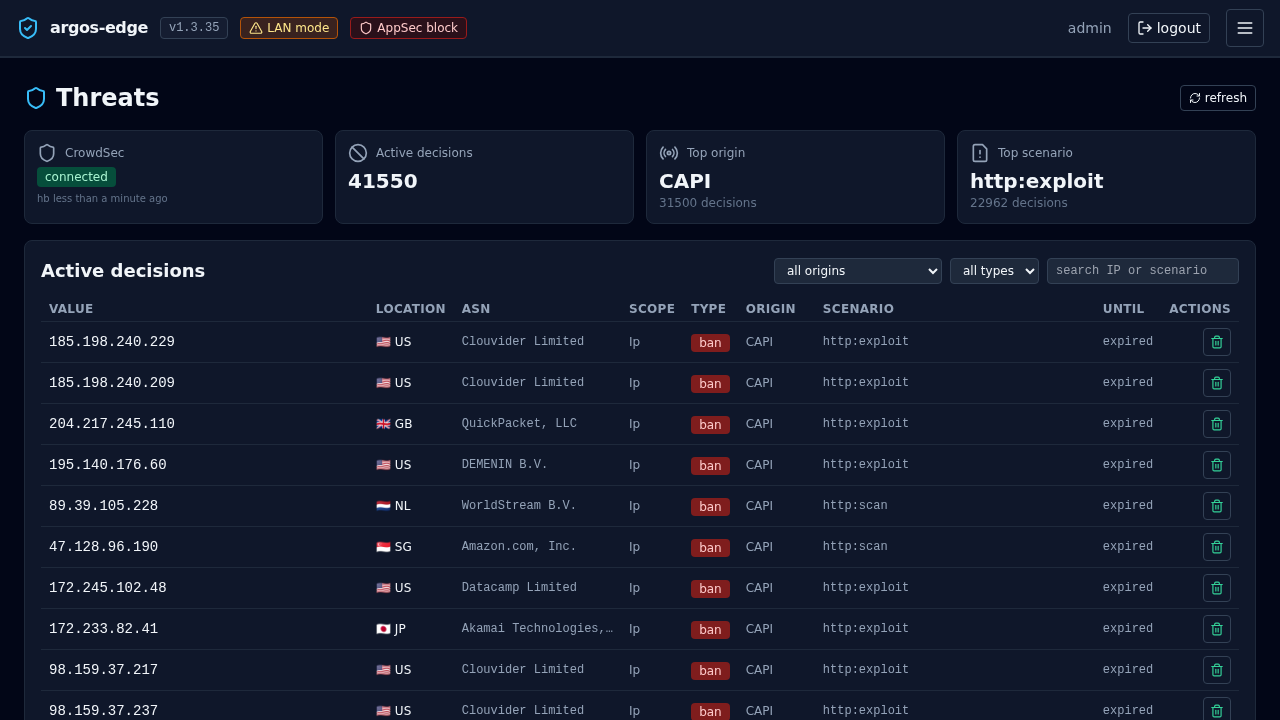
A decision is: (ip | cidr | range, scenario, duration, origin). Origins:
crowdsec— local detection produced it.community-blocklist— pulled from the community feed.cscli— created manually via the CLI.argos-panel— created via Threats → Add decision.
The bouncer caches active decisions and returns 403 for matching IPs before they reach Caddy's reverse_proxy. That is a key property — an IP banned by CrowdSec never has the chance to hit your WAF, rate limit, or upstream.
Creating a decision from argos
Threats → Add decision:
- IP (or CIDR, e.g.
192.0.2.0/24). - Duration —
4h,24h,7d, or a Go-duration string. - Reason — free text. Ends in the audit log + the LAPI row.
The decision takes effect on the next bouncer poll.
Removing a decision
Threats → row → Delete decision. Same latency as above.
The argos audit log keeps the trail whether the decision is still active or not.
Connectivity surface
crowdsec.enabled(setting) — master toggle for the panel's CrowdSec features. Off = Threats tab 503s, bouncer still runs.crowdsec.lapi_url— LAPI endpoint, defaulthttp://crowdsec:8081(docker bridge name). Change only if you run CrowdSec outside the compose stack.crowdsec.poll_interval_seconds— how often the bouncer refreshes its cached decision set. 15 s default. Lower = tighter reaction but more LAPI load; higher = coarser.
Panel status
Threats → Status (sub-tab) aggregates:
- Bouncer configured: yes/no (did Caddy receive a valid key?).
- LAPI reachable: yes/no.
- Community enrolled: yes/no + last sync.
- Currently active decisions count + origin breakdown.
- Installed collections count.
When the feed sync fails for long enough the panel emits a crowdsec_down notification event (see Notifications).
Gotchas
- The bouncer runs in Caddy, not argos. A panel outage does not stop ban enforcement. Restarting the argos container does not clear bans.
- CrowdSec's own DB is not in argos backups. If you lose the
crowdsec_datavolume you re-enroll; community feed re-downloads on its own. - Local decisions are time-bounded. Default scenario durations are in the minutes-to-hours range. Long-term bans need the community feed or a manually added decision.
- Enrolling re-keys the instance. If you enroll a machine that was already enrolled under a different code, the old enrollment rotates out. Keep the codes somewhere recoverable.
Related
- WAF — sibling component; WAF fires AFTER the bouncer check.
- Respond to an attack — operational flow.
- Notifications — alert on bans + CrowdSec outages.