Local auth (password + TOTP)
The fallback authentication path for the panel. Every argos install starts with exactly one local admin — the one bootstrapped from ARGOS_INITIAL_ADMIN_USER + ARGOS_INITIAL_ADMIN_PASSWORD at first boot. That admin is the break-glass route if OIDC ever misbehaves.
Password lifecycle
- Hashing — bcrypt at cost 12. One canonical helper (
auth.HashPassword) with an 8-char minimum enforced before the bcrypt call. Passwords longer than 72 bytes get silently truncated by bcrypt's design; the API-edge input length guards stay well below that. - Storage —
users.password_hash(TEXT, nullable). NULL for OIDC-only users. - Verification —
auth.Authenticate. ReturnsErrUnauthorizedfor wrong password / unknown user / OIDC-only user, with timing parity across all three paths so an attacker cannot enumerate usernames by measuring response latency. Unknown users burn a dummy bcrypt cycle, same as OIDC-only users. - Rate limit — 5 failed attempts per IP in a 5-minute window triggers a 30-minute ban. The ban is persisted in
login_attemptsso it survives a panel restart.
There is currently no password-change UI. Rotating a local password requires either the env-var bootstrap path (change the .env + restart; creates a new user with the new name, does not touch an existing user's hash) or direct SQL.
Enrolling TOTP
Every local user can add TOTP as a second factor.
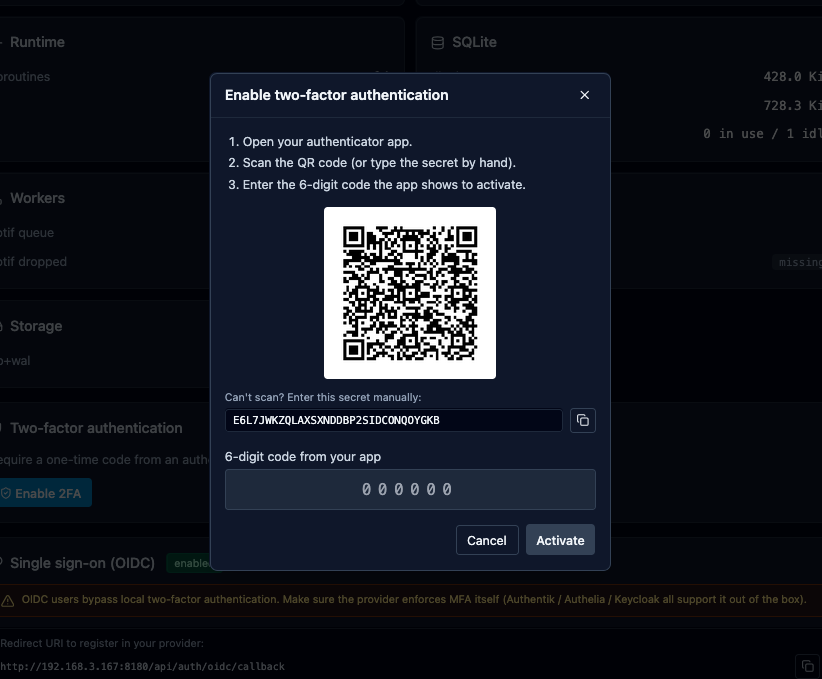
- System → Two-factor authentication → Enable 2FA.
- Panel generates a fresh 160-bit secret (base32-encoded), plus ten one-shot recovery codes.
- Dialog shows the QR, a copy-able secret, and the recovery codes — all once.
- Scan the QR with Aegis / 1Password / Google Authenticator / Bitwarden.
- Type the 6-digit code to confirm. The panel flips
totp_enabled=1and stampstotp_enabled_at. - Save the recovery codes before closing the dialog. The panel stores them encrypted and never shows them again.
The secret is encrypted at rest with ARGOS_MASTER_KEY (AES-GCM, fresh nonce per encrypt). Same key encrypts the recovery codes blob.
Login flow with TOTP
- POST
/api/auth/loginwith username + password. - Argos verifies bcrypt. On success, if the user has TOTP enabled, the response is
{ "requires_totp": true, "challenge_id": "..." }and no session cookie is set yet. The challenge is a 32-char opaque id valid for 5 minutes. - Client shows a 6-digit input. User types the code (or a recovery code).
- POST
/api/auth/totp/verifywith challenge_id + code — or/api/auth/totp/recoverywith challenge_id + recovery code. - On success, argos mints the session cookie + 302s to the original destination.
TOTP rate limit
Independent of the password rate limiter. Per (user_id, ip) — 5 failed TOTP attempts in 15 minutes buys a 30-minute lockout. Scoping by user AND ip avoids a shared outbound NAT (home behind CGNAT, an office) letting one user's fat-finger lock out everyone else behind the same egress.
Configurable via the constants in internal/totp/repo.go but the panel ships with the defaults and does not expose a UI knob.
Recovery codes
Each code is 8 base32 chars in xxxx-xxxx form, stored as a JSON blob of 10 lowercase strings and encrypted. Used once; the panel strips them from the list on consumption and persists the shorter list atomically via a compare-and-swap write (so two concurrent requests with the same code cannot both succeed — exactly one wins, the other sees invalid recovery code).
Consuming a code ends up in one of:
- 200 OK + session cookie. User is in.
- 401
invalid recovery codeif the code was already used / mistyped. - 503
concurrent modification, please retryif the CAS loop hit its retry cap (3 attempts). Rare.
Regenerating the recovery set
If you have already used some codes and want a full fresh 10, or if you suspect the codes leaked:
System → Two-factor authentication → Regenerate recovery codes.
- Dialog asks for your password (same rationale as
/totp/disable— a stolen session alone cannot do this). - Panel creates 10 new codes, encrypts, overwrites the old blob.
- Shows the new codes once. Copy or download as .txt.
Old codes are dead the instant the dialog closes.
OIDC-only users cannot regenerate (no password to verify), and the endpoint returns 400 with feature not available for OIDC-only accounts in that case.
Disabling TOTP
System → Two-factor authentication → Disable 2FA:
- Requires password + either a fresh 6-digit code OR a recovery code. Belt-and-braces so a stolen-at-keyboard session cannot disable 2FA on its own.
- Clears the encrypted secret and recovery codes. The
totp_enabled_atstamp is wiped.
Break-glass: disable 2FA without the codes
If you locked yourself out — lost the authenticator, ran out of recovery codes — the CLI is the escape hatch:
--useris mandatory, as is--yes(prevents accidental invocations).- Audits as
totp_disabledwithsource=cli. - Does NOT change the password; log in with the password alone after.
Audit trail
Every auth event carries remote_ip and user_agent in the audit log source. Relevant actions:
login— successful password + TOTP.login_totp_challenge— password OK, waiting for the TOTP step.failed_login— password wrong. User was anonymous; userID=0.rate_limited_login— IP hit the 5-fails ban.totp_enabled,totp_disabled,totp_activate_failed,totp_rate_limit_hit,totp_login_success,totp_recovery_used.recovery_codes_regenerated.logout.
Filter by source = audit AND message LIKE 'login%' in the Logs tab for a per-IP login attempt history.
Related
- OIDC SSO — the other login path.
- Onboard an admin — how to add more admins (OIDC only; no UI user-create yet).
- CLI —
argos disable-2fadetails.